
Custom presentation URLs

Share your presentations on your own branded address, yourcompany.seidat.com/spring-offer.
Overview
When your workspace has its own subdomain on Seidat, your share links can use a short, readable path that carries your name and describes the content. A custom link is simply a second, tidier address for a normal share link, so it keeps the same expiry date, notes, and open notifications — and the original hashed link keeps working alongside it.
Your subdomain is set up by Seidat rather than something you create yourself, because it needs its own web address and security certificate. Once it is in place, anyone who can create a share link on a presentation can give that link a custom path. Viewers need nothing — they open the custom address and the presentation plays exactly as it would from a hashed link.
Getting your workspace subdomain
A subdomain is the branded part of the address, such as yourcompany in yourcompany.seidat.com. To set one up, contact Seidat with the name you would like. Seidat registers it and maps it to your workspace, and from then on the custom path option is available when you create a share link.
Important note: The names app, www, and seidat can't be used as a subdomain, as they are reserved.
Creating a custom-path share link
1. Open the presentation and go to its share view.
2. Click Create new link.
3. Choose Custom path instead of Hashed link.
4. Choose your workspace subdomain, then type the path you want after it.
5. Check the full address in the live preview, then save the link.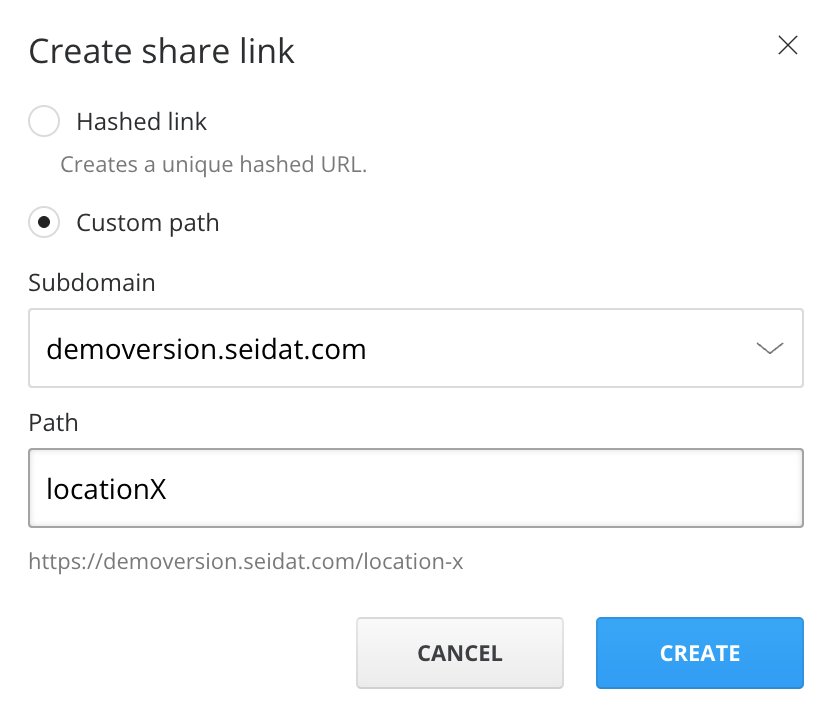
As you type, Seidat tidies the path for you — a title like Sales Deck becomes sales-deck. If you paste a full web address, only the path part is kept.
A valid path:
is 3 to 80 characters long
uses lowercase letters, numbers, and hyphens
is unique on your subdomain — each path can belong to only one active link
If you type a path that another active link already uses, Seidat tells you "This path is already in use." so you can choose another. A workspace can hold up to 200 custom paths.
Important note: If Custom path is not available when you create a link, your workspace does not yet have an active subdomain — the option is disabled with the message "This workspace has no active subdomain." Contact Seidat to set one up.